
Long Mod (New)
Over the last few months most nodes have been moved over to Long_Mod to deal with the obviously slow performance of the LONG_SLOW mode. This mode wasn’t originally available until the 2.6 mesh version. It has been significantly more successful for us.
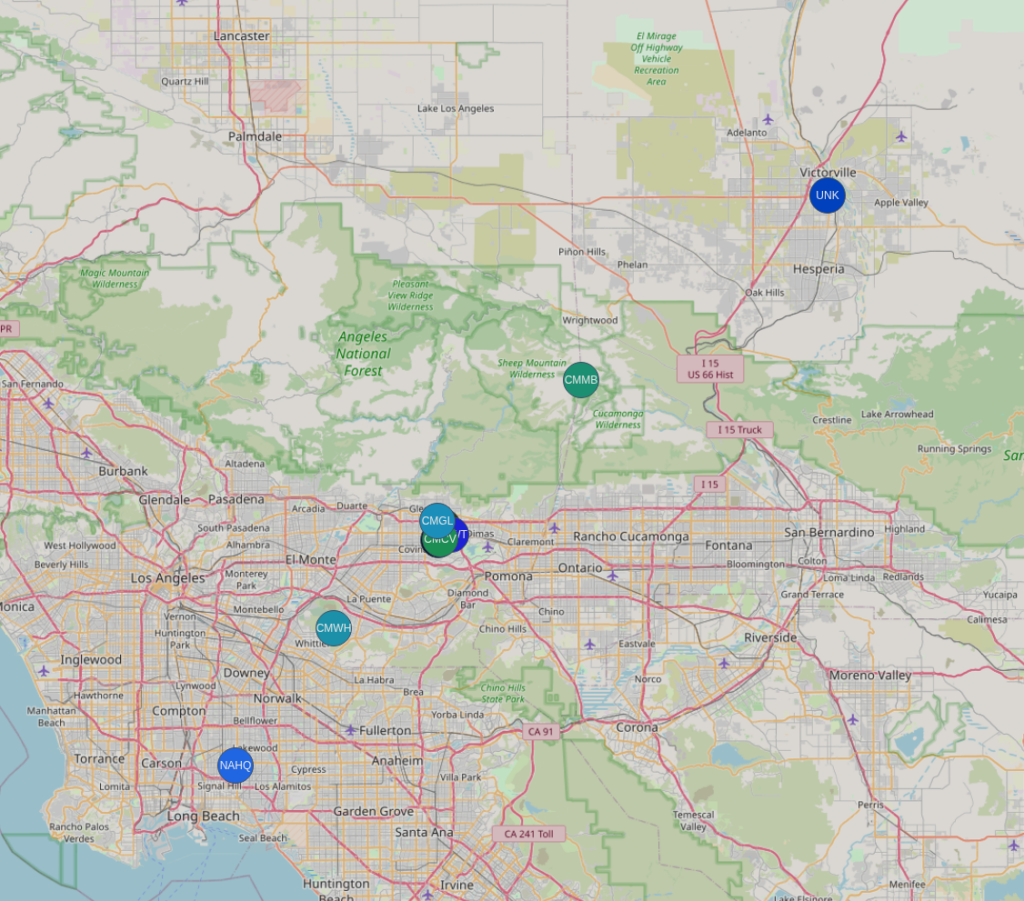
The default configuration is generally appropriate for your node, however if you have a lot of peer nodes in your geographic area, we suggest setting your role to “client_mute”. You can determine how many nodes are nearby by looking at the map.
Looking at the map below, you can see there is a cluster of nodes in the eastern San Gabriel Valley where many of us are based. However, there are nodes all over desert Los Angeles County, and pushing further east into San Bernardino County.
Long Slow Mode (Depreciated)
We default to the “LONG_SLOW” modem setting to ensure wider range and more resilient communications.
The SCM channel is our default “chat” channel. If you wish to communicate with us, say hello, or send out a ping, this is the place to do it.
Channel settings are available with the QR code, be sure to select “add” when scanning the channel.

If you are adding the channel to a T-Deck, or manually the settings are:
Name: SCM
Key (256): oy/HI2aMz0YkY+BtztL9nsKDhDthGYOr2eiivCknw24=